A contractor I worked with last year had every technical control in place. Splunk was ingesting logs. MFA was enforced across all endpoints. Their firewall rules were tight. They were confident walking into their C3PAO assessment. Six weeks later, they received a findings report with 34 deficiencies, not one of them related to a missing security control. Every single finding was a documentation problem: artifacts that couldn't be traced to specific NIST SP 800-171 control IDs, evidence files with no timestamps, and policies that referenced system boundaries from a network architecture they'd decommissioned eight months prior.
This pattern repeats constantly. The Defense Industrial Base has a documentation crisis masquerading as a security compliance problem. According to a 2024 CyberAB analysis of C3PAO assessment outcomes, 91% of CMMC Level 2 failures trace to documentation gaps rather than absent technical controls. Contractors spend hundreds of thousands on security tooling and then lose certifications because their *proof* of those tools working doesn't meet assessor standards.
If you're preparing for a CMMC assessment, or if you've already failed one, the problem almost certainly isn't your security posture. It's your artifact engineering. And fixing it requires a fundamentally different mindset than most compliance programs teach.
The 91% Problem: Why Technical Controls Pass but Assessments Fail
C3PAOs don't reject you because your access control system doesn't work. They reject you because the evidence you produce about your access control system fails on three dimensions: format, staleness, and traceability.
Format failures look like this: an assessor asks for proof of AC.L2-3.1.1 compliance, and you hand them a screenshot of your Azure AD user list. That screenshot has no date stamp in the image metadata, no correlation to the specific NIST control, and no indication of who generated it or why. It's a picture, not an artifact. Assessors need system-generated reports with verifiable integrity, not manual screen captures.
Staleness kills assessments quietly. A contractor I advised had a $4.2M IDIQ at risk because their access control logs existed but hadn't been correlated to specific NIST control IDs since their initial self-assessment 14 months earlier. The logs were current. The evidence package was not. C3PAO assessors expect evidence that reflects your *current* operational state, and for continuous controls like access management and audit logging, "current" means within 30 days, not within the last fiscal year.
Traceability is the gap between "we do this" and "here is time-stamped proof we do this consistently, tied to a specific control requirement." Most contractors have a System Security Plan (SSP) that describes their controls in narrative form. Very few have an artifact chain where every SSP claim links to a dated, attributed, scoped piece of evidence. That linkage is what assessors actually evaluate.
The backlog compounds the pain. As of early 2025, the average wait time for a C3PAO assessment slot is 14 to 18 months in many regions. A failed assessment doesn't just cost you the remediation effort. It puts you 2+ years behind competitors who passed on their first attempt. The business development implications are severe: you can't credibly claim CMMC compliance in proposals, and evaluators are increasingly skeptical of vague "CMMC-ready" language.
CMMC Artifact Engineering: Building Documentation Assessors Accept
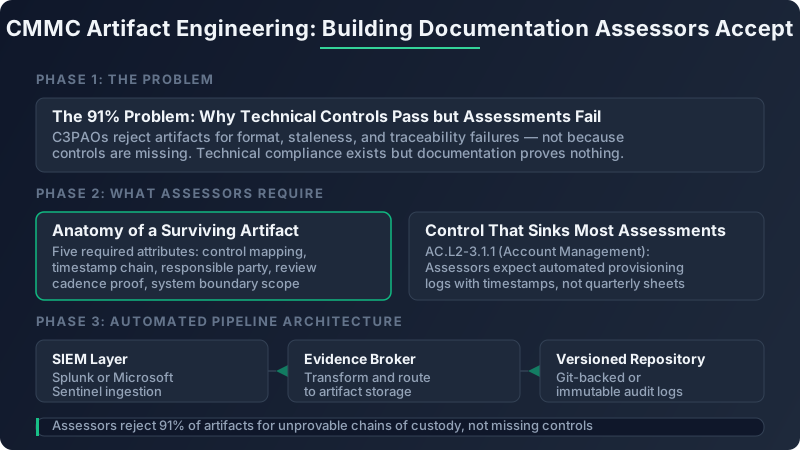
Anatomy of an Artifact That Survives a C3PAO Demonstration
Every artifact in your evidence package must satisfy five attributes before an assessor will accept it. Miss one, and the artifact gets flagged as insufficient.
- Control mapping: The artifact explicitly identifies which NIST SP 800-171 control(s) it supports, using the control ID (e.g., AC.L2-3.1.1, not just "access control")
- Timestamp chain: Creation date, collection date, and the period the evidence covers are all recorded and verifiable
- Responsible party: A named individual (not a team or role) who generated or approved the artifact
- Review cadence proof: Evidence that this artifact is part of a recurring review cycle, not a one-time collection event
- System boundary scope: Clear identification of which systems, enclaves, or CUI boundaries this artifact covers
Here's the practical difference. A screenshot of your MFA enrollment dashboard is weak evidence. A system-generated report from Azure AD's sign-in logs, exported as a CSV with SHA-256 hash verification, mapped to IA.L2-3.5.1, timestamped with the export date, attributed to your ISSO by name, and tagged with the CUI enclave identifier: that's an artifact that passes.
Your naming convention matters more than most contractors realize. I recommend this schema: `{ControlFamily}-{ControlID}_{EvidenceType}_{YYYY-MM-DD}_{Version}`. For example: `IA-3.5.1_SignInReport_2025-06-15_v2.csv`. When an assessor asks for evidence on a specific control, this naming lets your ISSO locate the right file in under 30 seconds. Generic names like "MFA_Evidence_Final_v3_REAL_FINAL.pdf" signal to assessors that your evidence management process is ad hoc.
The Three Controls That Sink the Most Assessments
CyberAB's 2024 findings data shows that three controls, AC.L2-3.1.1, IA.L2-3.5.1, and SC.L2-3.13.1, account for 38% of all C3PAO deficiency findings. If you fix nothing else before your assessment, fix these.
AC.L2-3.1.1: Account Management
Assessors expect automated provisioning and deprovisioning logs with timestamps. They want to see that when an employee is terminated, their account is disabled within a defined SLA (typically 24 hours), and that the disablement is logged with a timestamp and correlated to an HR action. What most contractors produce instead: a quarterly access review spreadsheet where a manager checked boxes next to active usernames. That spreadsheet proves you did a review. It does not prove your account management process works continuously.
What passes: An automated export from your identity provider (Okta, Azure AD, AWS IAM) showing account creation/deletion events over the last 90 days, with each event tagged to a ticket or HR system record.
IA.L2-3.5.1: Identification (MFA)
Showing that MFA is enrolled is not the same as showing MFA is enforced. Assessors want the Conditional Access policy configuration export (from Azure AD, Duo, or your IdP) proving that MFA is required for all users accessing CUI systems, with no exceptions. They also want sign-in logs showing that MFA challenges are actually occurring, not just configured.
What passes: The Conditional Access policy JSON export plus 30 days of sign-in logs filtered to CUI-scoped applications, showing MFA completion rates above 99%.
SC.L2-3.13.1: Boundary Protection
This is where the most expensive failures happen. Assessors require network diagrams that reflect *actual* CUI data flows with FIPS 140-2 (or FIPS 140-3) validated encryption points labeled at each boundary crossing. A Visio topology map from 2022 that shows your network segments but doesn't trace where CUI moves or identify encryption validation statuses will fail every time.
What passes: A current-state architecture diagram (updated within 90 days) with CUI data flows annotated, FIPS-validated encryption modules identified by certificate number, and boundary devices listed with firmware versions confirming FIPS compliance.
Key Statistics
91%
Of CMMC Level 2 failures traced to documentation gaps, not technical control deficiencies (CyberAB 2024)
38%
Of all C3PAO finding deficiencies concentrated in just three controls: AC.L2-3.1.1, IA.L2-3.5.1, SC.L2-3.13.1
$85K+
Annual labor cost for manual evidence gathering across 110 controls vs. $15K total for an automated pipeline
14-18 months
Average C3PAO assessment backlog, meaning a failed assessment puts you 2+ years behind
Engineering an Automated Evidence Collection Pipeline
Manual evidence gathering for 110 NIST SP 800-171 controls costs most mid-size contractors $85,000 or more annually in labor. An automated pipeline costs roughly $12,000 to set up and $3,000 per year to maintain. The math is obvious, but the architecture matters.
The pattern I've seen work best follows three stages: SIEM collection, evidence broker, and versioned repository.
Your SIEM (Splunk, Microsoft Sentinel, or equivalent) already collects the raw telemetry. The evidence broker is a lightweight orchestration layer, typically PowerShell or Python scripts running on scheduled tasks or cron, that queries your SIEM and other source systems, formats the output into control-mapped evidence packages, and deposits them into your artifact repository.
Here's a simplified example of a PowerShell script that pulls Azure AD sign-in logs and packages them as a control-mapped artifact:
# Evidence collection for IA.L2-3.5.1 (MFA Enforcement)
$startDate = (Get-Date).AddDays(-30).ToString("yyyy-MM-dd")
$endDate = (Get-Date).ToString("yyyy-MM-dd")
$logs = Get-MgAuditLogSignIn -Filter "createdDateTime ge $startDate" -All
$export = $logs | Select-Object UserPrincipalName, CreatedDateTime,
    MfaDetail, AppDisplayName, ConditionalAccessStatus
$fileName = "IA-3.5.1_SignInLogs_${endDate}_v1.csv"
$export | Export-Csv -Path ".\artifacts\IA\$fileName" -NoTypeInformation
$hash = (Get-FileHash ".\artifacts\IA\$fileName" -Algorithm SHA256).Hash
"$fileName,$hash,$endDate,ISSO-JSmith" | Out-File -Append ".\artifacts\manifest.csv"
The repository itself should be Git-backed (for diff-able version history) or SharePoint with immutable audit logs enabled. Git is preferable because it gives you native version control: assessors can see how a policy document evolved over time, not just its current state.
Artifact freshness rules vary by control type. Access management and audit controls need evidence refreshed every 30 days. Configuration management controls need quarterly evidence. Training and personnel security controls can operate on an annual cycle. Build your cron schedules around these windows.
Building a Defensible Artifact Repository Across All 14 Control Families
Your folder structure should mirror the NIST SP 800-171 control family numbering exactly. No creative reinterpretation.
| Control Family | Artifact Types Required | Refresh Cadence | Common Failure Mode |
|---|---|---|---|
| AC (Access Control) | Provisioning logs, access reviews, policy docs | 30 days | Spreadsheet-based reviews with no timestamps |
| AU (Audit & Accountability) | SIEM exports, log retention configs, review records | 30 days | Logs exist but aren't correlated to controls |
| CM (Configuration Management) | Baseline configs, change tickets, scan results | 90 days | Configs exported once and never updated |
| IA (Identification & Auth) | MFA policy exports, sign-in logs, IdP configs | 30 days | Enrollment proof instead of enforcement proof |
| SC (System & Comms Protection) | Network diagrams, encryption certs, boundary configs | 90 days | Stale diagrams that don't show CUI flows |
Version control is not optional. Assessors increasingly ask to see the *history* of a policy, not just the current version. If your Acceptable Use Policy was last updated in 2021 but claims to cover a CUI enclave you stood up in 2024, that's a contradiction that triggers deeper scrutiny. Git commit history or SharePoint version history provides the diff trail assessors want.
Role-based access to the repository itself matters. Assessors need read-only access during the evaluation window. Artifact owners (your ISSO and control leads) need write access. Nobody gets delete permissions. If you're using Git, enforce branch protection rules that require pull request approval before any artifact modification.
The Single Most Expensive Mistake in CMMC Prep
Do not build your artifact repository during assessment prep. Build it as your operational evidence system that runs continuously. Contractors who treat artifact collection as a pre-assessment sprint produce evidence packages full of contradictions, stale references, and one-time snapshots that assessors immediately recognize as fabricated compliance theater. The $85K annual manual cost isn't just expensive. It produces worse results than a $15K automated pipeline running year-round.
From Repository to Live Demo: Surviving the C3PAO Walkthrough
Stored artifacts are necessary but not sufficient. C3PAO assessors will ask your ISSO to reproduce evidence live during the assessment. They'll pick a control at random and say, "Show me your current access review process. Pull up the evidence right now."
Your ISSO needs to locate, generate, or display the relevant artifact within five minutes. If they can't, the assessor marks the control as "not demonstrated" regardless of what's in your repository.
Build a demonstration runbook keyed to each of the 110 controls. Each entry should include the pre-staged query or report generation command, the system where the evidence lives, and the expected output format. For example, the runbook entry for AU.L2-3.3.1 might read: "Open Splunk > Run saved search 'CMMC_AU_3.3.1_AuditEvents' > Export last 30 days as CSV > Verify hash against manifest."
Run a mock assessment before the real one. Schedule a half-day tabletop where someone plays the assessor role and randomly selects 20 controls. Your ISSO has five minutes per control to produce the artifact. Track success rates. If you're below 90% retrieval within the time window, you're not ready.
Common live demo failures I've witnessed:
- Broken links: Evidence stored in a SharePoint site that was reorganized since the last collection cycle
- Expired credentials: The service account used to query the SIEM had its password rotated and nobody updated the evidence collection scripts
- Contradictory artifacts: The network diagram in SC.L2-3.13.1 shows three CUI enclaves, but the access control artifacts in AC.L2-3.1.1 only reference two
Proposal Narratives: "CMMC-Certified" vs. "CMMC-Ready" and Why Evaluators Care
Government evaluators are increasingly sophisticated about CMMC claims in proposals. Saying "we are CMMC compliant" with no certificate number, no validity date, and no SPRS score context reads as a vague assurance, not a discriminating strength.
Specific language matters. Compare these two statements:
*Weak*: "Our organization is CMMC compliant and follows NIST 800-171 best practices."
*Strong*: "Our organization holds an active CMMC Level 2 certification (Certificate #C2-2025-04821, valid through April 2028), with a current SPRS score of 98. Our POA&M contains two items, both scheduled for remediation by Q3 2025, addressing planned migration from FIPS 140-2 to FIPS 140-3 validated modules."
The strong version gives the evaluator verifiable claims. They can check the certificate number against the CyberAB marketplace. They can see that your POA&M items reflect planned improvements, not open vulnerabilities.
When referencing your SSP in proposal volumes, summarize your security architecture at the boundary level without exposing specific IP ranges, tool configurations, or detection rules. Reference the DFARS 252.204-7021 clause explicitly and cross-reference your compliance matrix to show the solicitation's security requirements map to your certified controls.
If you haven't yet achieved certification, be honest about your status but frame it as managed risk: "Our organization is currently in the assessment pipeline with [C3PAO name], with assessment scheduled for [date]. Our pre-assessment internal review achieved 100% artifact readiness across all 110 controls." That's materially different from "We are CMMC-ready," which evaluators increasingly interpret as "We haven't started."
Your 30-Day Artifact Engineering Sprint
Week 1: Gap Audit. Pull your existing evidence package and check every artifact against the five required attributes (control mapping, timestamp chain, responsible party, review cadence proof, system boundary scope). Score each artifact as pass, partial, or fail. You will likely find that 40-60% of your artifacts are partial or failing. Focus your remediation on the three high-failure controls first: AC.L2-3.1.1, IA.L2-3.5.1, and SC.L2-3.13.1.
Week 2: Automate the Top 10. Deploy scheduled evidence collection scripts for the 10 controls most frequently cited in C3PAO deficiency findings. Start with access management, MFA enforcement, audit logging, vulnerability scanning (pull from Tenable or Rapid7 automatically), and configuration baselines. Each script should output a named, hashed, control-mapped file into your repository.
Week 3: Build the Repository. Create your folder structure mirroring all 14 control families. Migrate existing artifacts with proper metadata. Enable version control and set access permissions. Write your artifact manifest file tracking every evidence item, its freshness date, owner, and hash.
Week 4: Simulate. Run a tabletop C3PAO walkthrough. Pick 25 controls at random. Time your ISSO on each retrieval. Document failures and fix the retrieval process, not just the artifacts.
The one metric to track weekly from this point forward: percentage of 110 controls with assessment-ready artifacts updated within their required freshness window. If that number drops below 85%, your certification is at risk regardless of how strong your technical controls are. Pin it to a dashboard. Review it every Monday. That single number tells you more about your CMMC readiness than any consultant's maturity assessment ever will.
Start the gap audit today. Pull ten artifacts from your current evidence package and check them against the five attributes. If more than three fail, you have the same problem that 91% of failed assessments share, and now you know exactly how to fix it.